
Appearance
Register a Device
NOTES
- Registration creates a device record in the system. It is a separate step from adding a device to a company.
- In Cloud deployments, Advantech devices are already present in the manufacturing database and only need to be added — manual registration is rarely required.
- In On-Premises deployments, devices must be registered before they can be added, because On-Premises installations do not have access to the manufacturing database.
- Support for the WebAccess/DMP platform is limited for the S1 Router models.
When Registration Is Required
Register a device manually only if:
- You are using an On-Premises deployment.
- The device cannot be added using the standard Add Device process.
- Support has instructed you to register the device manually.
If you are using the Cloud instance and a device cannot be added, contact wadmp@advantech.com and include:
- Serial Number
- MAC Address
- IMEI (if applicable)
- Device Type
- A screenshot of the error message
Registering a Device
Navigate to the Dashboard.
Click the Add (plus) icon above the device table.
Open the Register Device tab.

Enter the required device information.
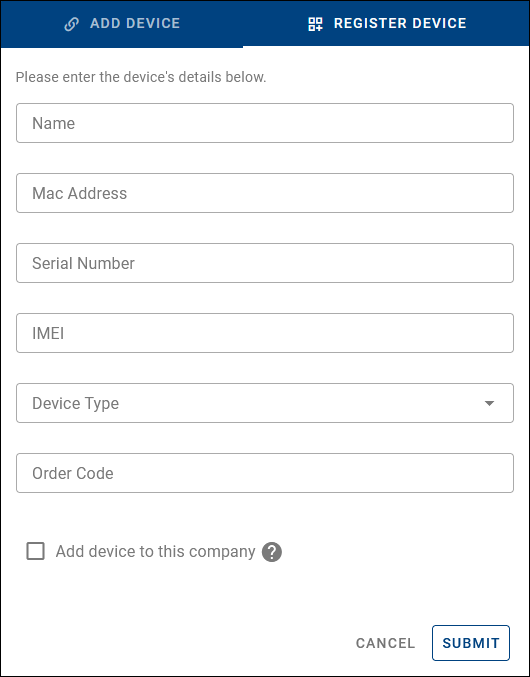
Click Submit.
If the Add device to this company option is enabled, the device is registered and immediately added to the current company. Otherwise, it is only registered and must be added later using Add Device.
Form Fields
- Name (optional) — A human-readable name for the device. Can be changed later.
- MAC Address (required) — The MAC address of the device's primary network interface (format:
00:11:22:AA:BB:CC). - Serial Number (required) — The exact serial number as printed on the device label.
- IMEI (optional) — Required only for cellular devices.
- Device Type (required) — The correct hardware model.
- Order Code (optional) — Internal or purchase reference. Does not affect functionality.
- Add device to this company — If enabled, the device is registered and immediately added to the current company; if disabled, it is only registered and must be added later using Add Device.
Register via API
Devices can also be registered programmatically using the dedicated device registration endpoint. See the API documentation.