
Appearance
Synchronization Policies
A Synchronization Policy controls when a device synchronizes — it defines the time windows during which synchronization is active. Outside those windows, the device's synchronization is paused, and while it is paused WebAccess/DMP does not communicate with the device. Communication resumes when synchronization becomes active again. Policies are created and managed in the Synchronization Policies section (under Profiles & Policies).
Two built-in policies are always available and cannot be deleted:
- Never — Synchronization is always paused.
- Always — Synchronization is active around the clock (24/7).
Built-in policies are read-only but can be cloned as a starting point for a custom policy.
Creating a Synchronization Policy
In the Synchronization Policies section, click + CREATE to open the Create Synchronization Policy dialog. Provide a Name and an optional Description, define one or more synchronization windows, and click Save.
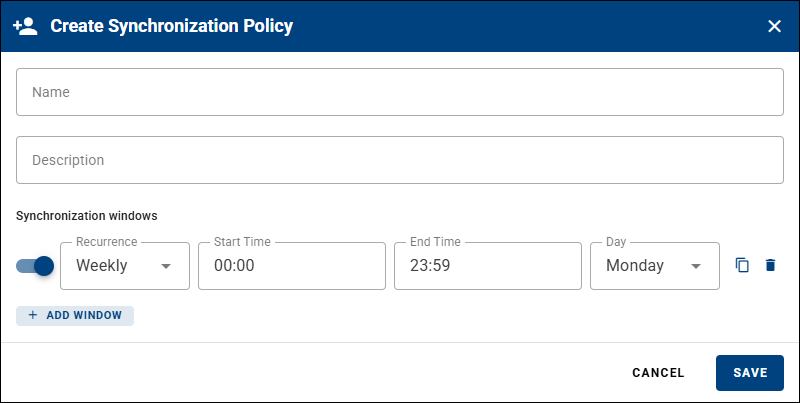
Each synchronization window has:
- A toggle to enable or disable the window.
- Recurrence — Weekly (repeats every week on the selected day) or One-time.
- Start Time and End Time — the time span of the window.
- Day — the day of the week the window applies to.
Click + ADD WINDOW to add more windows to the same policy. Each window can be cloned or removed using the icons next to it.
Assigning a Policy to a Device
A Synchronization Policy is assigned to a device through the Sync Policy field. Set this field like any other field — for a single device, or for many devices at once (for example, all devices with a certain tag) — as described in Fields and Device Configuration.
Three related synchronization fields are available by default. They cannot be deleted; only their name and description can be edited:
| Field | Description |
|---|---|
| Sync Policy | The synchronization policy assigned to the device. |
| Synchronization Status | The device's current synchronization status. |
| Is Synchronization Paused | Whether the device's synchronization is currently paused. |
Managing Synchronization Policies
In the Synchronization Policies section, each custom policy has actions to edit, clone, and delete it. The Current Synchronization column shows the policy's current state (for example, Paused) and the next scheduled window.